저번 포스트에서는 웹캠을 통해 얼굴의 위치를 찾는 코드를 구현해보았다.

이번 포스트에서는 해당 코드에서 이어 인식된 얼굴에서 눈의 위치를 찾는 것을 구현해보도록 하겠다.


먼저 사람의 얼굴을 68개의 점으로 표현한 데이터가 있다.

shape_predictor_68_face_landmarks.dat

위처럼 표현된 사람의 얼굴을 통해 사람의 눈의 위치를 찾도록 하겠다.


import cv2
import numpy as np
import dlib #68개의 점으로 얼굴을 인식한다
cap = cv2.VideoCapture(0)
detector = dlib.get_frontal_face_detector()
predictor = dlib.shape_predictor("shape_predictor_68_face_landmarks.dat")

while True:
	_, frame = cap.read()
    gray = cv2.cvtColor(frame, cv2.COLOR_BGR2GRAY)
    faces = detector(gray)
    for face in faces:
      # x, y = face.left(), face.top()
      # x1, y1 = face.right(), face.bottom()
      # cv2.rectangle(frame, (x, y), (x1, y1), (0, 255, 0), 2)
    
    landmarks = predictor(gray, face)
    left_point = (landmarks.part(36).x, landmarks.part(36).y)
    right_point = (landmarks.part(39).x, landmarks.part(39).y)
    hor_line = cv2.line(frame, left_point, right_point, (0, 255, 0), 2)
    
cv2.imshow("Frame", frame)
key = cv2.waitKey(1)
if key == 27:
	break
        
cap.release()
cv2.destroyAllWindows()

predictor .dat파일을 설정한 후 위처럼 얼굴을 68개의 점으로 활용할 수 있도록 landmarks 변수에 지정한다.

위의 그림처럼 눈의 끝 꼬리의 점인 36번과 39번을 line으로 연결하여 나타내었다.

실행 결과 아래와 같이 눈의 끝과 끝을 잘 검출하는 것을 알 수 있었다.
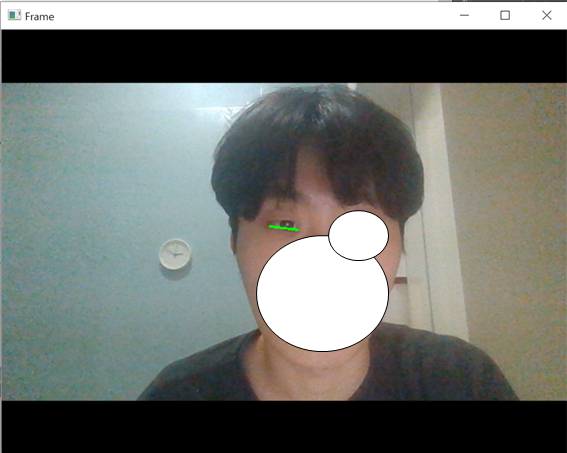
실행 결과

다음 포스트에서는 눈의 깜빡임 감지를 구현해보겠다.

'Study > Python' 카테고리의 다른 글

Opencv를 활용한 Eye-Tracking(1)  (0) 2020.05.11

Python을 활용하여 구현할 수 있는 간단한 프로젝트를 생각하던 중 Opencv를 알게 되었다.

OpenCV는 Computer Vision 프로그래밍을 쉽게 할 수 있도록 도와주는 Library로 실시간 영상처리, 3D 구성, 추적,

기계학습 그리고 딥러닝까지 유용한 기능이 매우 많다. 

따라서 Opencv 라이브러리를 활용하여 Eye tracking 기술을 구현해볼 것이다.


먼저 눈동자의 위치를 검출하기 위해서는 얼굴의 위치를 찾고, 얼굴에서 눈의 위치를 찾고, 눈에서 홍채를 찾아내는 순으로 Eye tracking을 구현할 수 있다. 

import cv2
import numpy as np
import dlib #68개의 점으로 얼굴을 인식한다

cap = cv2.VideoCapture(0)
detector = dlib.get_frontal_face_detector()
predictor = dlib.shape_predictor("shape_predictor_68_face_landmarks.dat")

while True:
	_, frame = cap.read();
    gray = cv2.cvtColor(frame, cv2.COLOR_BGR2GRAY)
    faces = detector(gray)
    
    for face in faces:
    	x1, y1 = face.left(), face.top()
        x2, y2 = face.right(), face.bottom()
        
    cv2.rectangle(frame, (x1, y1), (x2, y2), (0, 255, 0), 2)
    cv2.imshow("Frame", frame)
    
    key = cv2.waitKey(1)
    
    if key == 27:
    	break
        
    cap.release()
    cv2.destroyAllWindows()

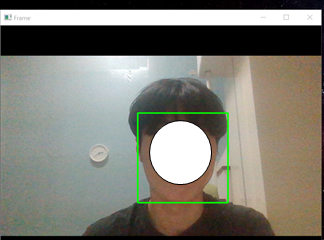
cv2를 이용해 웹캠을 실행시키고, dlib에 포함되어 있는 dlib.get_frontal_face_detector를 활용하여 카메라를 통해 인식된 얼굴을 faces에 저장시킨다.

이후, 얼굴의 꼭지점을 x y 변수에 저장시켜 사각형을 만들어 얼굴을 검출하도록 하였다. 실행결과는 아래와 같다.


실행 결과

얼굴을 상하좌우로 움직여도 인식률이 굉장히 좋은 것을 알 수 있다.


'Study > Python' 카테고리의 다른 글

Opencv를 활용한 Eye-Tracking(2)  (1) 2020.05.11

+ Recent posts